
claude-brain-kit
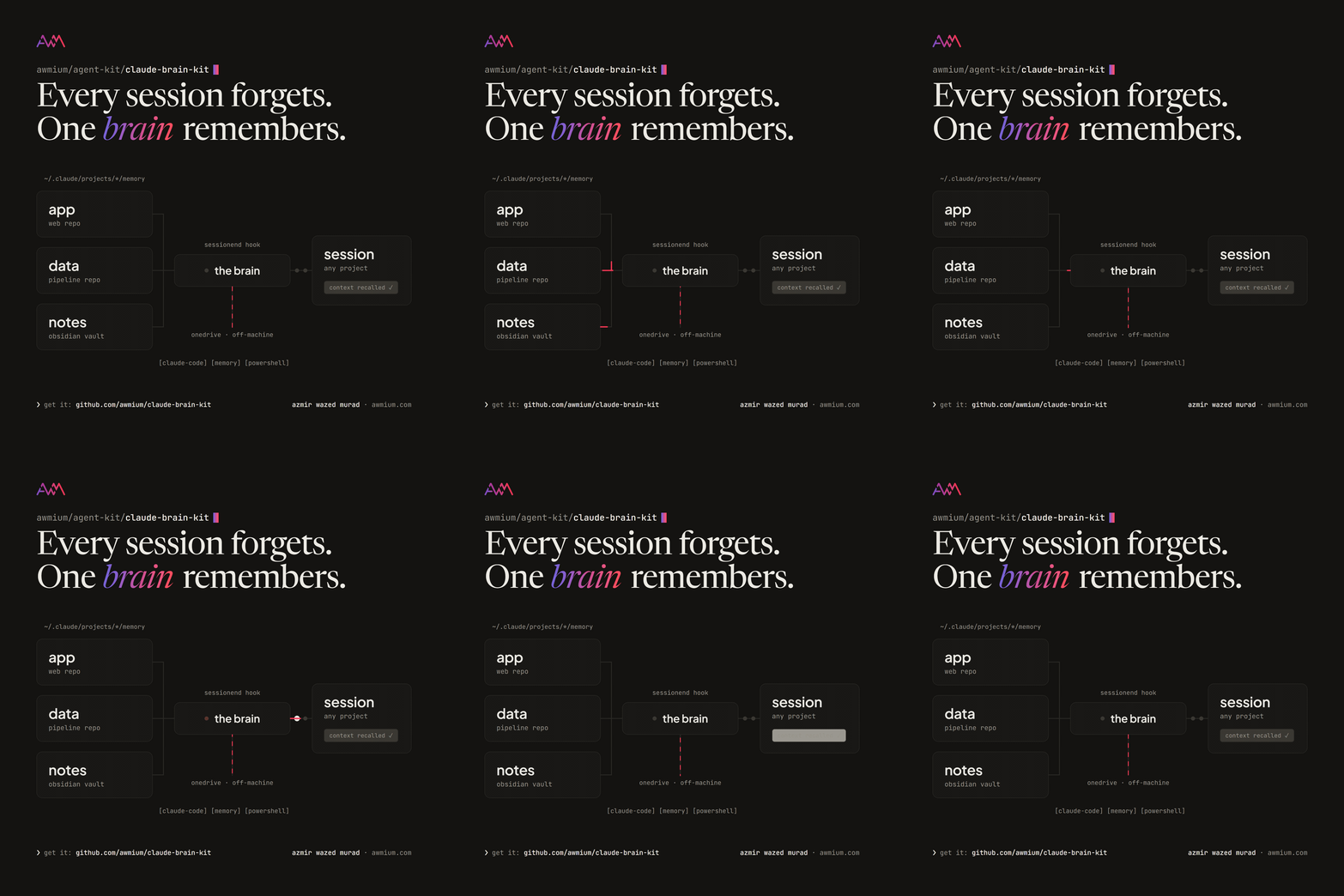
Claude Code remembers, but only per project. Each repo gets its own memory folder under ~\.claude\projects\, invisible to every other project and backed up nowhere, so what Claude learns about you in one repo is lost the moment you open another. claude-brain-kit gives all of them one Brain: a single folder, ideally inside OneDrive or an Obsidian vault, that becomes the consolidated master of everything Claude knows about you, your machine and your projects.
It is deliberately small: one PowerShell script, one hook entry and one block of instructions. No service, no database, no dependencies.
The kit makes no network calls and reads no credentials. Off-machine backup happens only because you choose to put the Brain inside a folder your own sync client already watches.
How it works
Two small mechanisms, one deterministic and one instructed.
- A SessionEnd hook. When a Claude Code session ends, the hook runs
brain-backup.ps1. The script walks every project under~\.claude\projects\, skips empty memory folders and worktree projects, and mirrors each memory folder into its own folder underBrain\projects\with robocopy/MIR. Deletions propagate too, so the Brain never drifts behind and a memory you removed does not linger. Each run stampsBrain\last-backup.txtwith the time and the projects it synced. - A block in your global CLAUDE.md. It tells every session, in every project, where the Brain lives and how to use it: read cross-project facts from
Brain\global\before asking or guessing, and write new cross-project facts there. A session in a brand-new repo with no memory of its own still knows who you are and how your machine is set up.
The per-project folders stay the working copies Claude Code loads. The Brain is the human-browsable master on top of them, and your sync client carries it off-machine.
Install
You need Windows (PowerShell 5.1 or 7+), Claude Code with auto-memory active (your ~\.claude\projects\ folder has project folders with a memory\ subfolder), and a synced folder for the Brain.
git clone https://github.com/awmium/claude-brain-kitThe fast way: open Claude Code and ask it to set up claude-brain-kit following the README in your clone. It does the six steps for you. It will ask where the Brain should live, because that decides what gets synced where; it never picks a location on its own.
The manual way, in short:
- Create
Brain\withBRAIN.md(from the kit’s template),global\andprojects\. - Copy
brain-backup.ps1to~\.claude\scripts\and set$brainRootat the top to your Brain folder. - Run it once and check that
Brain\last-backup.txtappears:
powershell -NoProfile -ExecutionPolicy Bypass -File "$env:USERPROFILE\.claude\scripts\brain-backup.ps1"- Merge the SessionEnd entry from
settings-hook-snippet.jsoninto~\.claude\settings.json. Append to an existinghooksorSessionEndarray rather than replacing it, then validate the file, because a malformed settings.json silently disables everything in it:
jq . ~/.claude/settings.json- Append
claude-md-block.mdto~\.claude\CLAUDE.mdand put your Brain path in it. - Start a fresh session, end it, and check that
last-backup.txthas a new timestamp. Ask the next session where its global memory lives: it should name your Brain.
Use
Day to day there is nothing to run. Work as usual; every session end refreshes the mirrors.
Brain\global\is yours and Claude’s: who you are, machine quirks, standing preferences, references that apply everywhere. Seed it by copying the clearly machine-wide memories out of your busiest project. When a fact lives in both places, updateglobal\first, then the project copy.Brain\projects\belongs to the hook. It is a true mirror, so manual edits there are overwritten on the next run. Edit the source memory instead and the mirror follows.- Readable folder names: mirrors are named after Claude Code’s sanitized project paths by default. Add entries to
$friendlyNamesin the script to give projects short names:
$friendlyNames = @{
    'd--Repos-My-Project' = 'my-project'
}
Memory files are plain markdown with frontmatter and links, so a Brain inside an Obsidian vault renders natively, and the graph view shows how your memories connect.
Privacy and limits
- What it touches: it reads
~\.claude\projects\*\memory\and writes copies into your Brain. It never modifies the original memories, makes no network calls and reads no credentials. - What you sync is your choice: memory files can hold anything Claude was asked to remember. Put the Brain in a private folder if you do not want that content in a shared or synced location.
- It does not change what Claude Code loads. Each session still auto-loads only its own project’s memory; the Brain adds instructed recall on top and cannot inject a second memory directory.
- It does not sync anything itself. Off-machine backup is your sync client’s job.
- Windows only as shipped. The script relies on robocopy; it is about forty lines, so an rsync port for macOS and Linux is straightforward.
Troubleshooting
- The hook never fires: hooks load when a session starts. Restart Claude Code or open
/hooksonce, then check that settings.json still parses withjq. - Nothing is mirrored: the script skips memory folders with no files and any project whose folder name contains
-worktrees-. Check that the project has saved at least one memory. - A mirror has an ugly folder name: add the raw name to
$friendlyNames; the next run creates the friendly folder, then delete the old one. - The new session does not know about the Brain: CLAUDE.md is read at session start, so start a new session after step 5, and check that the block’s path matches
$brainRoot.
Development
The kit’s scope is deliberately narrow: mirror on SessionEnd, recall through CLAUDE.md. Open an issue before a pull request that grows it. There is no automated test suite; changes are tested on a real machine by running the script, ending a session, and checking last-backup.txt and the mirrors. Keep brain-backup.ps1 compatible with Windows PowerShell 5.1. An rsync port (brain-backup.sh, same mirror behaviour) would be a welcome contribution.
Uninstall
Remove the SessionEnd entry from ~\.claude\settings.json (or disable it in /hooks), delete the block between <!-- brain:start --> and <!-- brain:end --> in ~\.claude\CLAUDE.md, and delete brain-backup.ps1 from ~\.claude\scripts\. Deleting the Brain folder removes every copy the kit made; your original memories under ~\.claude\projects\ are never touched.