
claude-stats
Your Claude Code usage, sitting in the VS Code status bar where you will actually see it. No panel to open and no surprise at 90%: the number is just there, it turns amber at 80% and red at 95%, and hovering shows every limit your plan has and when each one resets.
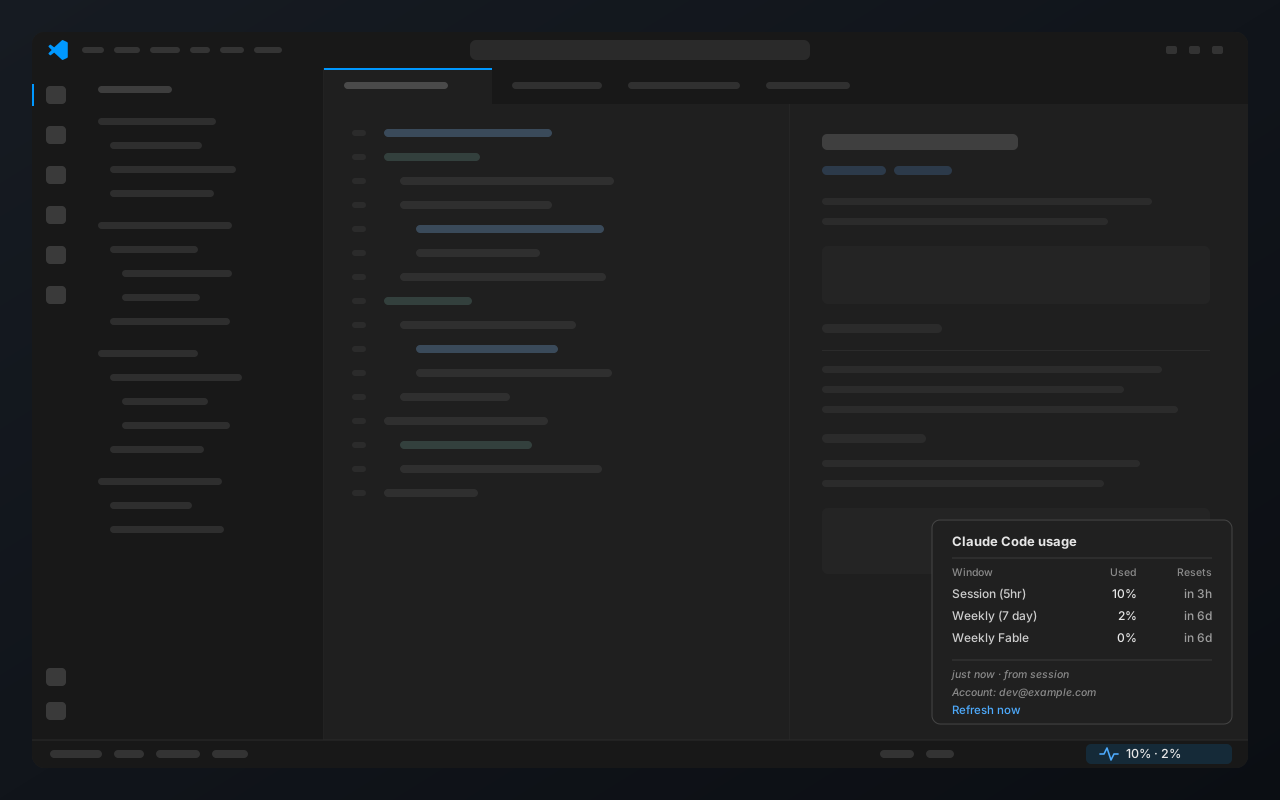
Tokens are spent on inference, calls to /v1/messages, and nothing here makes one. The bridge reads stdin and writes a file inside a session you were already having, and the poll hits an endpoint that reports your limits instead of drawing against them.
Install
You need Claude Code signed in on a paid plan, Node 20+, and VS Code 1.85+. Insiders and Cursor work too.
git clone https://github.com/awmium/claude-stats.git
cd claude-stats
./scripts/install.sh.\scripts\install.ps1Then quit VS Code completely and reopen it, because a window reload will not pick up a new extension. The item stays empty until your next Claude Code message, which is when the first reading arrives. Flags if you need them: --target insiders, --target cursor and --force, or -Target Insiders and friends in PowerShell.
Claude Code allows only one. The installer spots yours, leaves it alone and tells you. To run both, point statusLine at a small wrapper like the one below, or re-run the installer with --force and hand the hook over.
#!/usr/bin/env bash
input=$(cat)
printf '%s' "$input" | node ~/.claude/claude-stats/statusline-usage.js > /dev/null
printf '%s' "$input" | your-existing-statuslineHow it works
Two small pieces, about 250 lines of dependency-free JavaScript between them.
claude-stats/
├── src/bridge/statusline-usage.js   on the statusLine hook, caches usage to a file
├── src/extension.js                 watches that file, renders the item and hover
├── scripts/                         install and uninstall: VS Code, Insiders, Cursor
└── test/ 31 node:test cases, no network- The bridge runs on every Claude Code message. Claude Code pipes it the live session state, which includes your usage, and the bridge caches that to a file and passes the percentages back so your own status line keeps working.
- The extension watches that file. When no session has reported for a while it asks the usage endpoint directly, so the number does not freeze the moment you stop working.
- The rows come from your account, not from a hardcoded list. The server sends the windows it tracks for you, names included, so a per-model budget shows up on its own and an account without one simply has no row.
- Colour follows the session window alone. Weekly and per-model windows never colour the item, so amber or red always has one visible cause you can act on.
Every cached reading is stamped with the account that produced it. Sign in as someone else and the item stays empty until real data arrives, instead of quietly showing the last account’s numbers.
Settings
| Setting | Default | What it does |
|---|---|---|
claudeStats.pollWhenStale | true | Ask the usage endpoint when no session has reported lately. Set false to stay fully offline. |
claudeStats.staleAfterMinutes | 10 | How stale a reading can get before that kicks in. |
CLAUDE_CONFIG_DIR is respected if you have moved your Claude Code config.
Credentials
It reads your Claude Code state, so here is exactly what it does with it.
- Nothing is stored. The cache file holds percentages, reset times and which account they belong to. No token and no conversation content.
- The access token is read into memory for one request and thrown away: never written, cached, logged or put in a URL. An expired token means no request at all, and a 401 gives up instead of refreshing, because refreshing would mean writing to your credentials file.
- One network call, to
api.anthropic.com, the same endpoint Claude Code itself calls every hour. No telemetry, no analytics, and no dependencies that could add any. - Want none of it? Set
claudeStats.pollWhenStaletofalseand it touches no credentials at all.
The hover is trusted for the extension’s own refresh command only, and every value it shows (account email, error text, server-supplied window names) is escaped, so nothing in the data can turn into a live link.
Troubleshooting
- Nothing in the status bar. Quit VS Code fully instead of reloading. Still nothing? Open Developer: Show Running Extensions, look for ClaudeStats, and re-run the installer if it is missing.
- Stuck on an empty reading. Send one message in Claude Code. If it stays empty, check that the hook registered:
node -e "const o=require('os');console.log(require(o.homedir()+'/.claude/settings.json').statusLine)"- Empty right after switching accounts. That is deliberate, and it clears on the next message.
HTTP 401in the hover. The token expired. Using Claude Code refreshes it.- Nothing on an API key, Bedrock or Vertex. Those have no plan limits, so there is nothing to show.
Uninstall
./scripts/uninstall.sh.\scripts\uninstall.ps1This removes the extension, the bridge, the cached reading and the statusLine entry, but only if that entry is the one claude-stats installed. Your original settings.json was backed up on first install.
Development
npm testThirty-one tests with no network, no dependencies and no build step, run against a throwaway config directory so they never touch your real Claude Code state. CI runs them on Linux, macOS and Windows with Node 20 and 22. The rule for contributions is short: write the failing test before the fix, and prove it fails.
/api/oauth/usage is undocumented and could change. If it does, the bridge carries on and you only lose the idle refresh. Organisation credit pools are left out on purpose: on Team plans that is billing state, not your usage.
MIT licensed. Not affiliated with or endorsed by Anthropic.