
---
date: 2025-09-22
tags: [power-bi, dax, udf]
stack: [power-bi, dax, tmdl]
read: 2 min
---
Streamlining report formatting with DAX UDFs
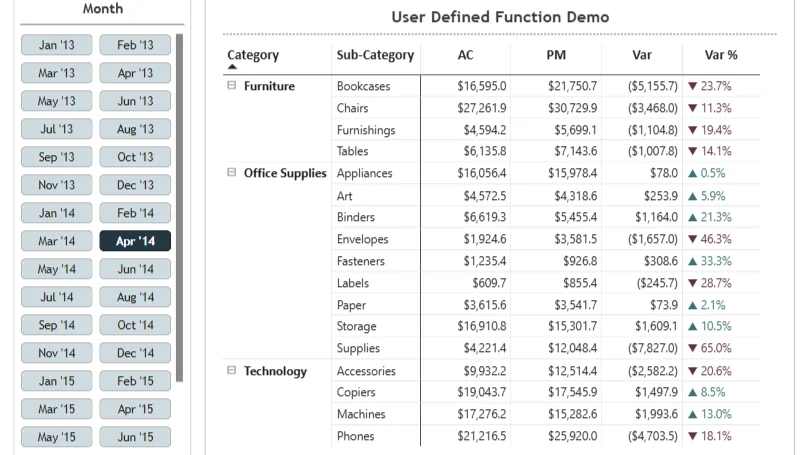
One of the best parts of the Power BI September 2025 update is the arrival of user-defined functions (UDFs) in DAX.
I started experimenting with them and built two small but powerful helpers for my regular reporting workflow:
FUNCTION FMT_Percentage = ( Percentage : VAL ) =>
FORMAT( Percentage, "▲ 0.0% ; ▼ 0.0% ; 0.0%" )FUNCTION FMT_Percentage_Color = ( Percentage : VAL ) =>
SWITCH(
TRUE(),
Percentage > 0, "#3e7075",
Percentage < 0, "#603045",
"#171717"
)What they do
- Instead of writing conditional formatting rules in every report, I can now wrap any percentage measure with these UDFs.
FMT_Percentagetakes care of consistent arrow-based formatting for variances.FMT_Percentage_Colorprovides the semantic colours for conditional formatting.
How it works
FMT_Percentagereturns a text string with the right arrow and percentage.FMT_Percentage_Colorreturns a hex colour code that Power BI can use directly in conditional formatting.- Both functions take any percentage measure as input.
Benefits
- Consistency: every percentage measure looks and behaves the same.
- Efficiency: no more repetitive formatting logic across visuals.
- Scalability: one change in the UDF updates every dependent measure.
These small functions already save me time every day, and this is just the beginning. UDFs are going to change how reusable logic gets built in DAX.
Copyable TMDL snippet
Add the snippet below to your own model in Power BI:
- Open the TMDL editor.
- Paste this snippet, then apply and save.
createOrReplace

	/// Formats percentages with arrows for up/down/neutral
    function 'Awm.Format.FMT_Percentage' =
        ( Percentage : SCALAR ) =>
            FORMAT( Percentage, "▲ 0.0% ; ▼ 0.0% ; 0.0%" )
    annotation Library = Awm.Format
annotation Version = 1.0.0createOrReplace
/// Semantic hex colors for positive, negative, neutral
function 'Awm.Format.FMT_Percentage_Color' =
( Percentage : VAL ) =>
SWITCH(
TRUE(),
Percentage > 0, "#3e7075",
Percentage < 0, "#603045",
"#171717"
)
annotation Library = Awm.Format
annotation Version = 1.0.0Then use them in your measures:
Sales Var% (Formatted) = Awm.Format.FMT_Percentage( [Sales Var%] )
Sales Var% (Color)     = Awm.Format.FMT_Percentage_Color( [Sales Var%] )
tip Have you tried them yet?
UDFs are new enough that everyone is still finding patterns. I would love to hear what you are building with them.
First published on LinkedIn.
read# Streamlining report formatting with DAX UDFs[ ] sectionsTop