What a Fabric app is
A web app that lives in your workspace, and what it asks of you
Fabric Apps has been in preview long enough that most people in the Microsoft data world have seen the announcement. The questions I still get, from data teams and from the people who govern their tenants, are simpler ones. When someone says “we built a Fabric app”, what is actually sitting in the workspace? Which kind of app is our idea? And who has to say yes before the first one goes live?
This post answers those three, from building and reviewing Fabric apps since the preview opened. It is written for the people who will build, approve or look after one, so there is no code in it, and it ends with a checklist you can take into that first conversation.
It is one item with a few switches
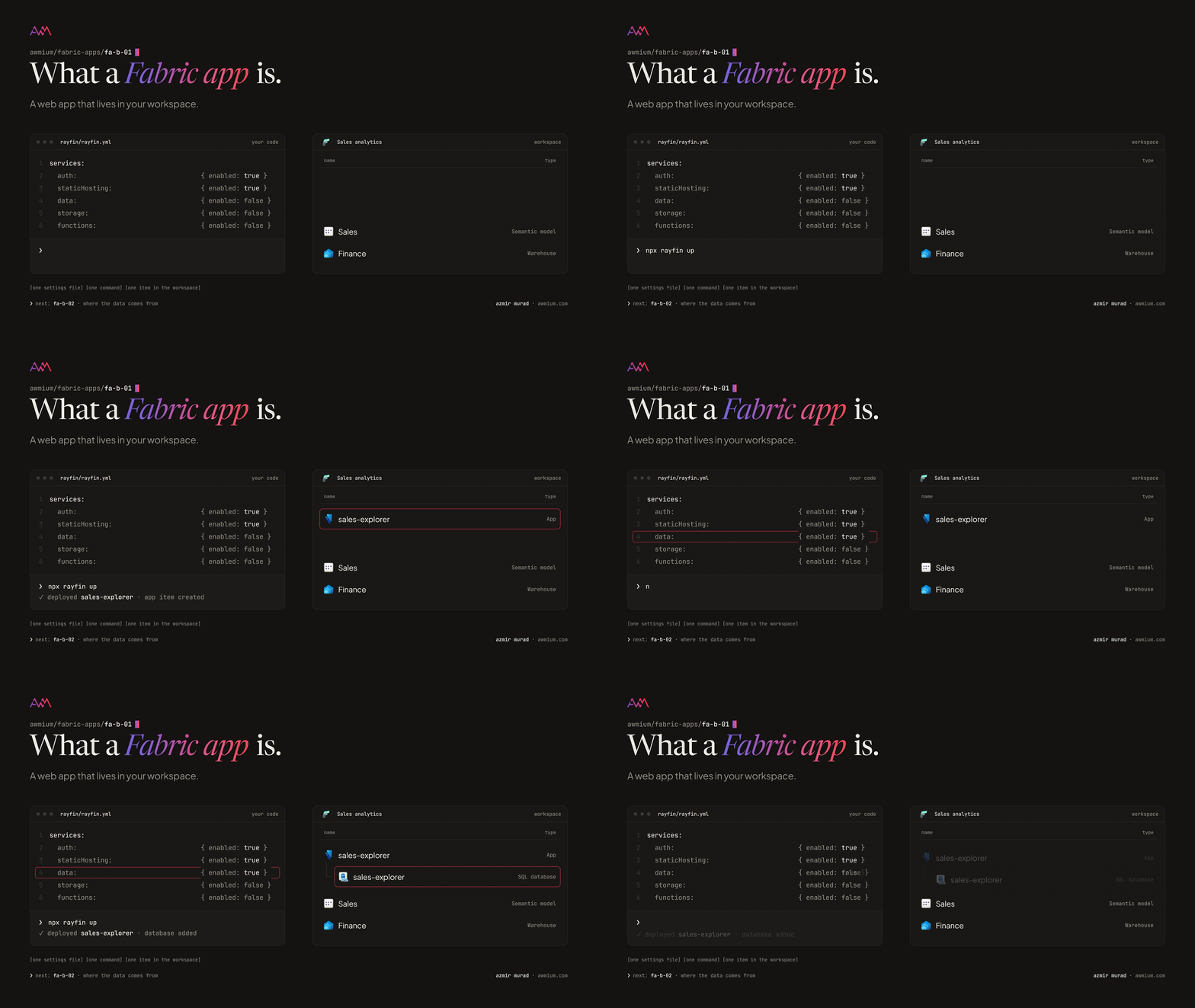
A Fabric app is an ordinary web application, a website your team writes and owns, plus one settings file that says which Fabric services it uses. Deploy it, and Fabric creates a single item of type App in your workspace, with those services attached to it.
There are only a handful of switches:
- Sign-in. People open the app with their normal work account, through Fabric. Once it is deployed, Fabric sign-in is the only kind it offers.
- Hosting. Fabric serves the website itself, so there is no separate web server to run or patch.
- A database. If the app needs to keep anything, it gets a real SQL database in Fabric, in the same workspace.
- File storage, for uploads and anything too large to ship with the website.
- Functions, small pieces of server code for the jobs a browser should never do, such as calling an outside service with a key.
Beside the switches sit connectors: typed links to data you already have in Fabric. A semantic model, a warehouse, a lakehouse or another SQL database. The app reads through them with the access of whoever is looking at it, not with some account of its own.
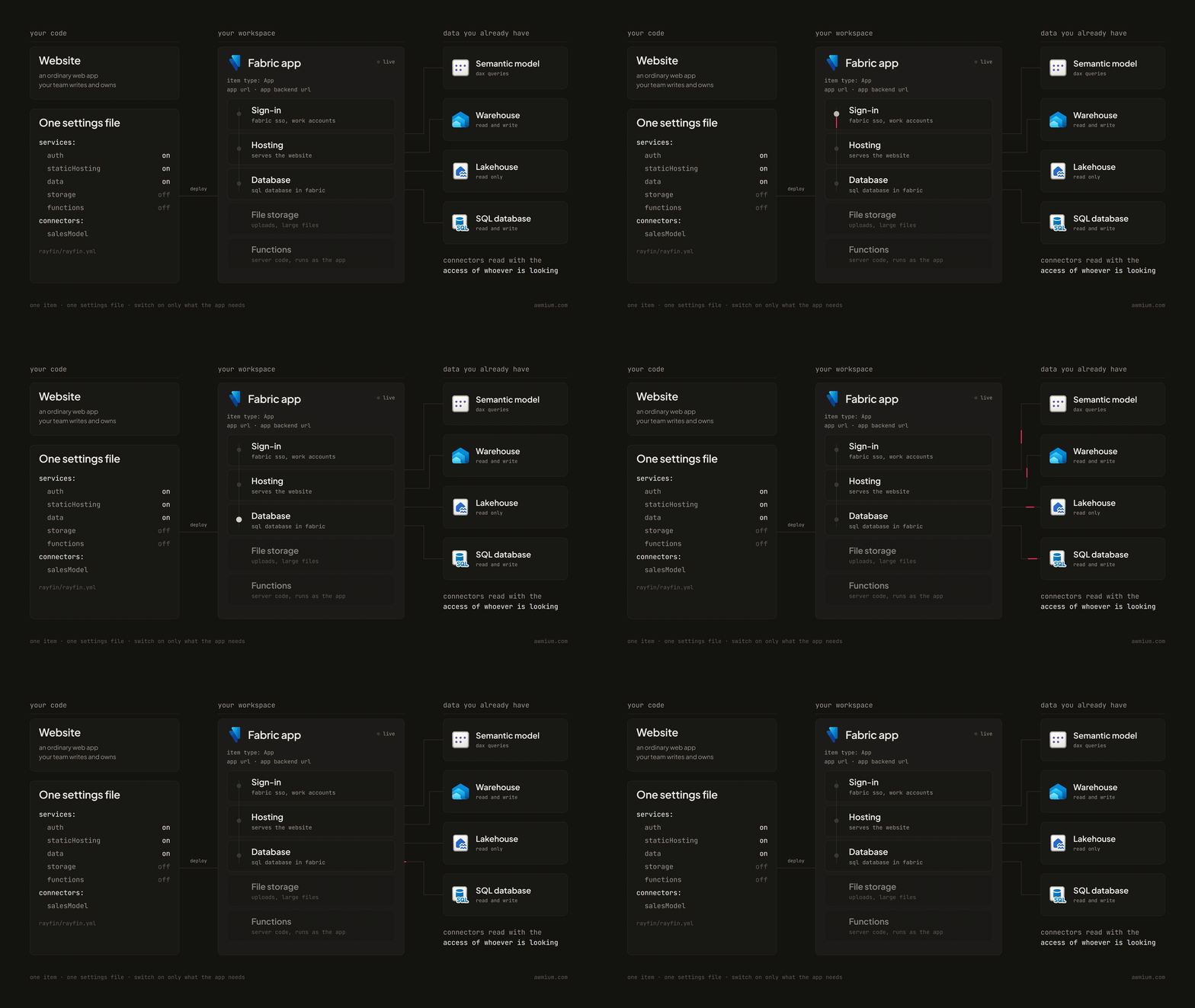
Fabric Apps is the product, and the App item is what your users open. Rayfin is the toolkit developers build it with: the SDK and its command line. You will see Rayfin all over the documentation and the code, but the thing in the workspace is a Fabric app.
What lands in the workspace
Open a deployed app in the portal and an owner sees two things.
First, the item itself, with two addresses: the App URL, where people open the app, and the App backend URL, a single address that serves its data, sign-in and files.
Second, a child item for each service the app switched on. The one worth knowing about is the SQL database. You can open it and run read queries like any other SQL database in Fabric, and because it is a real Fabric database, its data sits in OneLake for the rest of the platform to use. It also holds a list of the people who have signed in: there is no separate sign-up, so Fabric adds each person as a user of the app the first time they open it.

One thing to tell the database people early: the app’s tables are defined in its code, so the portal lets you read the database, not reshape it.
How one gets into the workspace
Every Fabric app goes through the same four stages, and each stage needs a different permission. Knowing them up front saves a round of “why can’t I deploy this”.

- Start from a template. In the workspace, New item and then App gives the developer a command that downloads a starting project; the same start works from the command line. Microsoft ships a small to-do starter, a data app template for apps over semantic models, and a public gallery of others. Creating one needs Contributor, Member or Admin on the workspace.
- Build in the team’s own editor. Today that usually means a coding agent does much of the typing, and the template comes with instructions written for it. While they work, the developer runs the website on their own machine against the app’s real backend in Fabric, signed in as themselves. How that sign-in works is a detail for the next posts; what matters here is that development touches a real item in a real workspace.
- Deploy with one command. It builds the website, applies any database changes and updates the item. It needs Edit on the item, and it refuses a database change that would lose data unless someone deliberately forces it.
- Use it from Fabric. People open it with their work account and need Run and interact on the item.
Two habits make this stage painless. Keep the code in a repository from day one, because the tables, the access rules and the website all live in it, and Fabric’s own Git integration does not cover apps yet. And once a team has built two or three apps, turn its conventions into its own template (the look, the sign-in flow, the folder layout). The command line can start a new app from a team’s template in a Git repository, so every new app begins from what was already agreed.
Three shapes I keep seeing
Almost every Fabric app I see fits one of three shapes, and the shape is decided by what the app reads, not by which switches are on. Knowing which shape an idea is tells you most of what it will need.
- It reads a semantic model. The most common shape for data teams. The app sends DAX queries to a model the business already trusts, as the person looking. Measures, relationships and row-level security stay where they are; the app is a new way to present and work with them. Microsoft’s data app template is built for this shape, with chart and table components and guidance written for coding agents.
- It keeps its own data. The shape that needs the most care. The app owns tables in its own database: an org chart people can correct, a planning sheet, an approvals log. Teams often arrive here from the first shape: a semantic model is read only, so the moment users need to edit, their edits need a home, and a SQL database the rest of Fabric can pick up is a good one. Switch the database on only when the app actually keeps something.
- It needs no Fabric data. Tools that carry a snapshot of their data inside the website itself, work on text the user pastes in (a model’s definition, to see how its measures depend on each other), or read a public feed from outside Fabric. Fabric gives them hosting and sign-in, and that alone is worth it: the tool lives where its users already work, behind the sign-in they already have.

This is the table I put in front of a team once we know the shape:
| 1. reads a semantic model | 2. keeps its own data | 3. needs no Fabric data | |
|---|---|---|---|
| good for | a custom front end on numbers the business trusts | forms, corrections, plans, approvals, logs | a browser tool, a snapshot, a public feed |
| where the data lives | in the model, unchanged | in a SQL database in the app’s workspace | in the website files, in what the user pastes, or outside Fabric |
| who decides what each person sees | the model: its permissions and row-level security | the app’s code: rules written on each table | who may open the app; a snapshot shows the same data to all of them |
| what a user needs | Run and interact on the app, Read and Build on the model | Run and interact on the app | Run and interact on the app |
| watch first | Build is a bigger grant than it sounds | review the rules the way you review RLS | keep hosting protected: a snapshot ships to every viewer |
The row to remember is the third one, who decides what each person sees. In shape 1, an app that reads a model, security is where it has always been, in the model. In shape 2, an app that keeps its own data, it moves into the code: next to each table, the developer writes who can read, add, change or delete, and which rows and fields. Fabric enforces those rules on every request, even one that skips the website and calls the app’s data address directly. But a rule is only as good as whoever wrote it, so give it the same review you would give row-level security before a model goes live.
One exception runs across all three shapes: when a function calls out to another service, it runs as the app’s identity (today, the owner of the app item), with whatever that identity has been granted, not as the person looking. That is exactly what you want for calling an outside service, and it is also where an app can reach things its users cannot. Put it on the approval list.
The shapes mix. An app can read its numbers from a model and keep its own small table of comments or sign-offs beside them. Start from the shape that matches the main job, and add the other when the need is real.
What it asks of your tenant
Before the first app, a few people each have one thing to do. This is the list I walk through with a team.
| who | what they decide or switch on |
|---|---|
| Tenant admin | Turn on Fabric Apps (preview), for everyone or for a security group. For apps over semantic models, the Semantic Model Execute Queries REST API setting must be on as well. A second Fabric Apps setting, Anonymous data access, is off by default; leave it off unless an app truly needs to serve data without sign-in, such as a public feedback form. |
| Capacity owner | The workspace needs Fabric capacity, in a region where Fabric Apps is available. Not every region has it yet. |
| Model owner | People who use a model-reading app need Read and Build on the model, because their queries run as them; without both, their queries are refused. Build is a bigger grant than it sounds; FA-B-03 explains why. |
| Workspace admin | Decide who can only run the app and who can change it. Run and interact is the default for workspace members; Edit is what deploys a new version; resharing needs the admin role. |
| The developers | Keep keys out of the code and the website files, keep the code in a repository, and keep hosting protected (sign-in required) unless the files are truly public. |
Everything an app does draws capacity units from the workspace’s capacity: the database’s compute and storage, the data API in front of it, any functions, and the OneLake storage that holds the website. Sign-in, the hosting service and the deploys themselves add no charge of their own. It all shows in the Capacity Metrics app like any other item, so watch it there for the first few weeks.
Four things people get wrong at first
- “Protected hosting keeps the data safe.” It keeps the website’s files behind sign-in. What each person can see is decided elsewhere: by the model’s permissions, or by the rules in the app’s code.
- “Sharing the app shares the data.” In an app that reads a model, it does not. Each person still needs their own access to the model, because every query runs as them. Give someone the app without the model and they get an app whose queries are refused.
- “We can tidy up a table in the portal.” The tables are defined in the app’s code. A change made any other way is overwritten on the next deploy, or breaks the app first.
- “People will need another login.” They use the work account they already have. The first time someone opens the app, Fabric adds them as a user; there is nothing to invite or set up.
Where it fits
Microsoft’s own guidance names the good fits: prototypes that need a live address quickly, internal tools and dashboards, custom front ends for exploring data, and apps that give AI agents somewhere to keep their state. It also names the poor ones: complex multi-step transactions, stored procedures, and sign-in through anything other than Fabric.
When a team brings me an idea for an app, my first two questions are who owns the data and who needs to change it. Those answers pick the shape, and the shape decides most of what follows: the template, the permissions, the database, the cost.
What to take away
- A Fabric app is your team’s website plus one settings file, deployed as one App item in your workspace.
- It switches on only what it needs (sign-in, hosting, a database, storage, functions), and connectors link it to data you already have, read as the person looking. Functions are the exception: when they call out, they run as the app’s identity.
- It takes one of three shapes: it reads a model, keeps its own data, or needs no Fabric data. The shape decides where security lives: in the model, in the app’s code, or simply in who may open it.
- It runs on your capacity, behind Fabric sign-in, under your permissions, with its code repository as the source of truth.
Before the first app goes live, settle these six questions with the people involved:
- Which shape is it, and where will its data live?
- Who owns the code repository, and who holds Edit on the item when the person who built it moves on?
- Who decides what each person can see: the model’s security or the rules in the app’s code? Who has reviewed them?
- Does it use functions, and what has the app itself been allowed to reach?
- Which tenant settings are on, for which groups, and which capacity does it run on? Who watches that capacity?
- What does it store about people (an app with a database also keeps a list of everyone who signed in), and does that need a line in your privacy notes?
Next in this series, FA-B-02, Where the data comes from: how to choose a Fabric app’s source by who owns the data and how fresh it has to be.
Fabric Apps is in preview, so details move. Everything here was checked against Microsoft’s Fabric Apps documentation on 23 October 2026. Where the two disagree later, the docs win.